
 What is it?
SPC Express for Windows is a fast, easy-to-use, professional statistical process control software package. It is a true 32 bit application and was designed to be used by both novices and experts alike. It runs on IBM PC or compatible computers using the Windows 98 or Windows XP/SP2 or newer, including Windows 10 operating system.
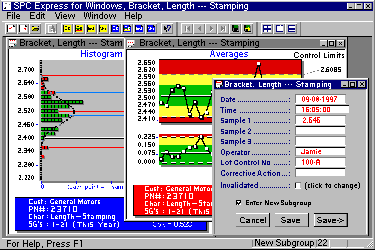
What makes it special?Ease-of-use is one of the key features of SPC Express for Windows. Just a few quick clicks of your mouse and you are ready to enter data and view a graph. It takes advantage of the standard Windows graphical user interface (GUI) that is universally known and used throughout the computer industry.

SPC Express for Windows is a very practical package for use right out on the shop floor. Data entry is simple, using either the keyboard or electronic gages. The on-screen charts are updated automatically and very easy to read.
The SPC Express Family of Software has been in use since 1983 in a variety of industries, such as automotive, plastics, aerospace, and food processing. Its popularity is largely due to its speed and intuitive operation. This new Windows version of SPC Express is an exciting addition to our product line.
What are its main features?
|
- Open up to 100 Parts & Characteristics on the screen at one time.
- All traceability fields can be customized for data entry, searching, and reporting.
- Versatile data entry from the keyboard or electronic gages with immediate plotting of new data points. The "pre-defined keyboard data entry" feature helps reduce typing and keystroke errors.
- Uses a Microsoft Access compatible database for maintaining records of your shop floor data and inspection information.
- Query based reporting engine lets you display or print all SPC charts based on almost any criteria such as all subgroups for a given job number, for a specific month.
- Variable charts including X-Bar R, Individuals & Moving Range, Moving Average & Moving Range, Histograms and more!
- Attribute charts including P, U, N, C and Pareto charts.
- Graphical scrolling forward and back through your process charts.
- While viewing a process chart, you can click on any subgroup point to pop-up a user-definable detailed view of its contents.
- On-screen Print Preview with zoom and scrolling capability.
- Universal network compatibility. (Requires a license for each workstation)
- Users can view any of their own drawings or instruction sheets for the selected part and characteristic.
- Easy-to-read Help screens and User’s Manual with a tutorial that will have you up and running in minutes.
How can it help you?You can use SPC Express to automate your SPC data collection, reporting, and analysis. If your SPC charting is now being done manually, or if your current computer system is difficult to use, cumbersome or slow, you’ll really appreciate using SPC Express. After all, you’re not in the business of drawing charts or running computers – you’re in the business of manufacturing your products!
User Support
Major Micro Systems is known for providing our users with great technical support. Our tech support lines are handled by engineers who not only know our software, but know PC hardware, communications interfacing, and excel at operating system troubleshooting. In addition to our free telephone support, we also provide electronic support via e-mail on the Internet. MMS also offers on-site installation, training, startup assistance, network configuration, and computer consulting.